Social Media Video Get Started Guide
If you’ve been putting off video because it feels complicated, expensive, or time-consuming, you’re not alone.
Most people assume they need the perfect setup before they start.
You don’t.
Video becomes manageable when you begin with strategy, use simple tools, and focus on progress instead of production value.
This guide walks you through how to get started without turning it into a full-time job
Start With Strategy, Not Equipment
Before you record anything, answer a few practical questions:
→ What type of video are you creating?
→ Where will you record: smartphone, desktop, or both?
→ Which platform are you creating for?
→ Do you want to script, outline, or speak more casually?
→ Where will you record, and what will your background look like?
These decisions shape everything else. When you skip them, you waste time experimenting instead of publishing.
Match the Format to the Goal
Not every video serves the same purpose.
→ Quick tips and insights work best as short-form videos, typically 30 to 90 seconds.
→ Teaching content or demonstrations using slides or screensharing fits longer videos, often 5 to 10 minutes or more.
Use the Format Social Platforms Prefer
Vertical video is now the default across most platforms.
→ 9:16 portrait video performs best on LinkedIn, Instagram, TikTok, Substack, and YouTube Shorts.
→ Square video still works, but it’s no longer preferred.
→ Landscape video is best reserved for longer YouTube training content.
Record Faster With Simple Techniques
One of the biggest time-saving shifts is how you record.
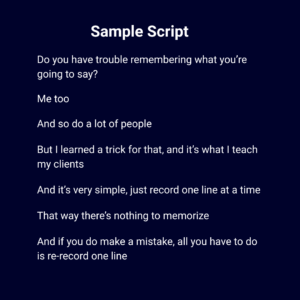
→ Record one line at a time instead of trying to nail everything in one take.
→ If you make a mistake, redo that line and keep going.
→ Clean it up during editing.
You can also:
→ Use short scripts to stay focused.
→ Draft scripts by speaking first, then refining the wording.
→ Try a teleprompter app if you prefer more structure (but expect a learning curve).
Use Tools You Already Have
You don’t need specialized gear to begin.
→ Record video on your Smartphone
→ Edit with Free apps CapCut and Canva (iPhone and Android)
→ Captions are not optional, easily add them with editing apps
Remember: Most viewers watch with the sound off, so captions improve both accessibility and engagement.